Free HPD-20 kits
24 custom kits for the Roland HPD-20 HandSonic, built and played on a real HPD-20. Download them one at a time or all at once, and load them with the free kit editor.
Download all 24 kits (.zip) Printable kit sheet (PDF)
How to load a kit onto your HPD-20
- On the HPD-20, save a backup to a USB stick (MENU → SYS → USB Memory → Save Backup).
- Open that backup in the kit editor, pick an empty slot (101–200) and click Import a kit into this slot. Repeat for as many kits as you like.
- Download the edited backup, copy it into the stick's Roland/HPD-20/Backup folder, and load it on the HPD-20 (MENU → SYS → USB Memory → Load Backup).
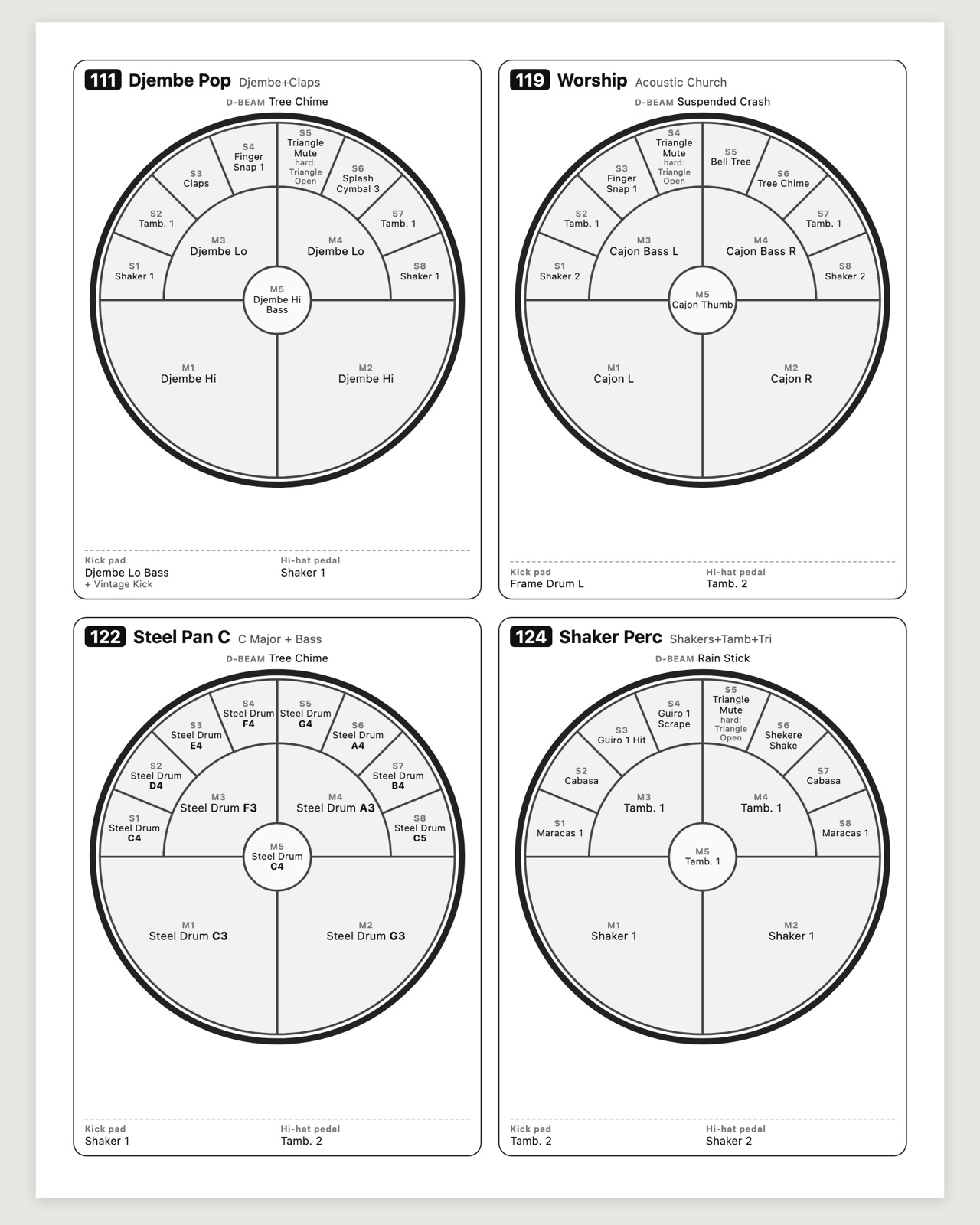
Every kit uses only the HPD-20's built-in sounds, so they work on any HPD-20 without extra samples. They follow a few simple rules: shakers and tambourines sit on two pads on opposite sides of the arc so you can alternate hands, a guiro gets one pad for the hit and one for the scrape, and the D-BEAM plays wind chimes or a cymbal swell.
Hand drums


 103 Conga 1 Conga II+Perc
Conga set with maracas and shaker pairs, guiro (hit and scrape on separate pads), cowbell and tambourine; claves on the hi-hat pedal.
Download kit 104 Conga 2 Conga Trio+Perc
Conga trio with cabasa, claves, wood blocks, triangle and tambourine.
Download kit
 106 Bongo 2 Conga&Bongo+Perc
Congas and bongos with ganza, agogo, vibra-slap and bell tree; foot tambourine.
Download kit
Rock and pop
 107 Unplugged Cajon+Perc
Cajon kit for acoustic pop: shaker pair, tambourine, splash, tree chime, finger snap, claves and triangle; foot tambourine.
Download kit 108 Rock Hands Two-Snare Rock
A drum kit with a snare under each hand; the kick moves to your kick pad.
Download kit
 110 Band Perc Conga+Perc
Congas and percussion to play next to a drummer: tambourine and shaker pairs, claps, triangle, cowbell, chimes.
Download kit 111 Djembe Pop Djembe+Claps
Djembe for pop: claps, finger snap, triangle and splash; djembe bass plus kick on the kick pad, shaker on the hi-hat pedal.
Download kit
To play alongside a drummer
 113 Rock Perc Congas+Tamb
Rock percussion that complements a drum set: congas, tambourine, claps and more, with no kick, snare or cymbals.
Download kit 114 Pop Perc Bongos+Shaker
Pop percussion for playing with a drummer: bongos, shakers, claps and finger snap.
Download kit 115 Latin Rock Congas+Timbales
Latin rock: congas and timbales with cowbell, agogo, guiro and claves.
Download kit 116 Ballad Perc Frame Drum+Bells
Soft frame drum and bendir with bell tree, chimes, triangle, rain stick and finger snap, for ballads.
Download kit 117 Funk Perc Congas+Guiro
Funk congas with guiro, clap and cowbell; tambourine and shaker pairs.
Download kit
Styles
 118 Reggae Island Perc
Reggae: congas, tumba and bongos with timbale fills, guiro and claves; a one-drop rim click on the kick pad.
Download kit 119 Worship Acoustic Church
Worship and acoustic church: cajon with shakers, tambourines, finger snap, triangle, bell tree and chimes; big frame drum on the kick pad.
Download kit 120 Samba Brazilian Perc
Samba: surdo and pandeiro with ganza, tamborim, repinique, agogo and cuica.
Download kit 121 Middle East Darbuka+Riq
Middle Eastern: darbuka and riq with finger cymbals, zills, frame drum and bendir.
Download kit
Melodic
 122 Steel Pan C C Major + Bass
Steel pan in C major: the scale from C to C across the top pads, chord roots C, G, F and A on the main pads.
Download kit 123 Kalimba Am A Min Pentatonic
Hand pan and kalimba in A minor pentatonic, where every note sounds good together.
Download kit
Shakers and percussion
 124 Shaker Perc Shakers+Tamb+Tri
Only shakers and hand percussion: shaker and tambourine pairs, a short tambourine hit in the center, triangle, maracas, cabasa, guiro, shekere and rain stick.
Download kit
Questions
- Are these HPD-20 kits free?
- Yes. All 24 kits are free to download, use and share. They use only the HPD-20's built-in sounds.
- Will loading a kit erase my other kits?
- No. Importing a kit with the kit editor only replaces the slot you choose. Loading the edited backup on the HPD-20 replaces its settings with that backup, which still contains all your other kits. Keep your original backup as an undo.
- What is an .hpdkit file?
- A single HPD-20 kit (its pad sounds, settings and effects) exported from the HPD-20 Kit Editor, so kits can be shared and moved between backups.